> ## Documentation Index
> Fetch the complete documentation index at: https://cometchat-22654f5b-feature-angular-multimedia-attachments.mintlify.site/llms.txt
> Use this file to discover all available pages before exploring further.
# Banned Members
> Banned Members — CometChat documentation.
## Overview
`CometChatBannedMembers` is a crucial [Component](/ui-kit/ios/v4/components-overview#components) that showcases users who have been restricted from participating in specific groups or conversations. Once banned, users lose access to content and discussions within the affected group. Administrators or owners wield the authority to ban members from groups they oversee, enabling them to monitor user activity and behavior closely. With CometChatBannedMembers, administrators can take swift and appropriate actions to maintain group integrity and uphold community standards.
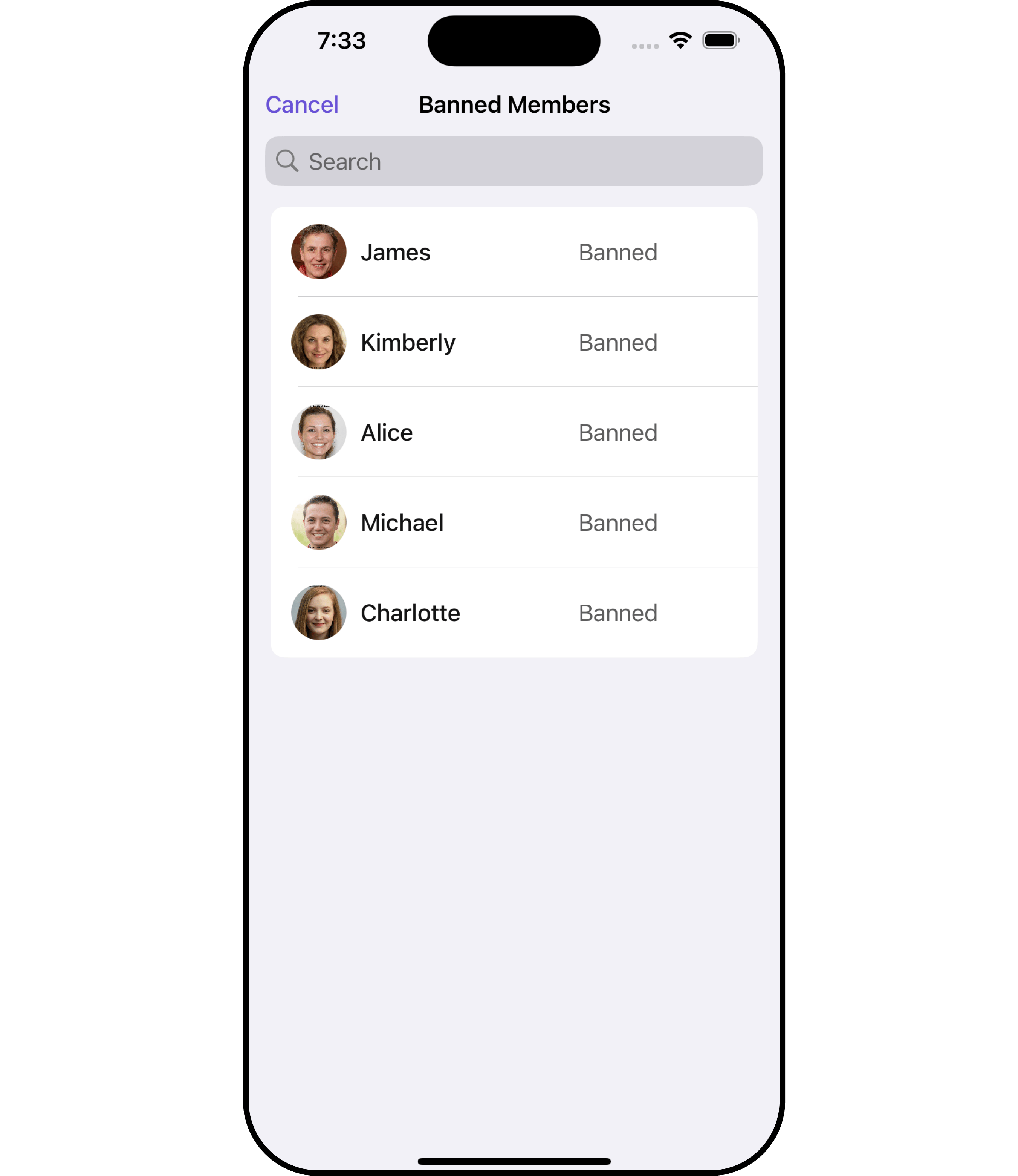 The `BannedMembers` component is composed of the following BaseComponents:
| Components | Description |
| --------------------------------------------- | --------------------------------------------------------------------------------------------------------------------------------------------------------------------------------------------- |
| [CometChatListBase](/ui-kit/ios/v4/list-base) | `CometChatListBase` serves as a container component equipped with a title (navigationBar), search functionality (search-bar), background settings, and a container for embedding a list view. |
| [CometChatListItem](/ui-kit/ios/v4/list-item) | This component renders information extracted from a `User` object onto a tile, featuring a title, subtitle, leading view, and trailing view. |
***
## Usage
### Integration
`CometChatBannedMembers`, as a custom **view controller**, offers flexible integration options, allowing it to be launched directly via button clicks or any user-triggered action. Additionally, it seamlessly integrates into tab view controllers. With banned members, users gain access to a wide range of parameters and methods for effortless customization of its user interface.
The following code snippet exemplifies how you can seamlessly integrate the BannedMembers component into your application.
```swift theme={null}
let group = Group(guid: "your UID", name: "", groupType: .public, password: .none)
let cometChatBannedMembers = CometChatBannedMembers(group: group)
let naviVC = UINavigationController(rootViewController: cometChatBannedMembers)
self.present(naviVC, animated: true)
```
If you are already using a navigation controller, you can use the pushViewController function instead of presenting the view controller.
***
### Actions
[Actions](/ui-kit/ios/v4/components-overview#actions) dictate how a component functions. They are divided into two types: Predefined and User-defined. You can override either type, allowing you to tailor the behavior of the component to fit your specific needs.
##### 1. SetOnItemClick
This method proves valuable when users seek to override onItemClick functionality within CometChatBannedMembers, empowering them with greater control and customization options.
The `setOnItemClick` action doesn't have a predefined behavior. You can override this action using the following code snippet.
```swift theme={null}
let group = Group(guid: "your UID", name: "", groupType: .public, password: .none)
let cometChatBannedMembers = CometChatBannedMembers(group: group)
.setOnItemClick (onItemClick:{ bannedMember in
//Perform Your Action
})
```
##### 2. SetOnItemLongClick
This method becomes invaluable when users seek to override long-click functionality within CometChatBannedMembers, offering them enhanced control and flexibility in their interactions.
The `setOnItemLongClick` action doesn't have a predefined behavior. You can override this action using the following code snippet.
```swift theme={null}
let group = Group(guid: "your UID", name: "", groupType: .public, password: .none)
let cometChatBannedMembers = CometChatBannedMembers(group: group)
.setOnItemLongClick (onItemLongClick:{ bannedMember in
//Perform Your Action
})
```
##### 3. SetOnError
You can customize this behavior by using the provided code snippet to override the `On Error` and improve error handling.
```swift theme={null}
let group = Group(guid: "your UID", name: "", groupType: .public, password: .none)
let cometChatBannedMembers = CometChatBannedMembers(group: group)
.setOnError (onError:{ error in
//Perform Your Action
})
```
##### 4. SetOnBack
Enhance your application's functionality by leveraging the `SetOnBack` feature. This capability allows you to customize the behavior associated with navigating back within your app. Utilize the provided code snippet to override default behaviors and tailor the user experience according to your specific requirements.
```swift theme={null}
let group = Group(guid: "your UID", name: "", groupType: .public, password: .none)
let cometChatBannedMembers = CometChatBannedMembers(group: group)
.setOnBack (onBack:{
//Perform Your Action
})
```
***
### Filters
**Filters** allow you to customize the data displayed in a list within a Component. You can filter the list based on your specific criteria, allowing for a more customized. Filters can be applied using RequestBuilders of Chat SDK.
##### 1. BannedMembersRequestBuilder
The `BannedMembersRequestBuilder` enables you to filter and customize the Banned Members list based on available parameters in BannedMembersRequestBuilder. This feature allows you to create more specific and targeted queries when fetching banned members. The following are the parameters available in `BannedMembersRequestBuilder`
| Methods | Type | Description |
| -------------------- | ------ | -------------------------------------------------------------------------------------------------- |
| **setLimit** | Int | sets the number of banned members that can be fetched in a single request, suitable for pagination |
| **setSearchKeyword** | String | used for fetching banned members matching the passed string |
**Example**
In the example below, we are applying a filter to the banned members by setting the limit to 1.
```swift theme={null}
let group = Group(guid: "Your-uid", name: "", groupType: .public, password: .none)
let bannedGroupMembersRequestBuilder = BannedGroupMembersRequest.BannedGroupMembersRequestBuilder(guid: group.guid).set(limit: 1)
let cometChatBannedMembers = CometChatBannedMembers(group: group, bannedGroupMembersRequestBuilder: bannedGroupMembersRequestBuilder)
let naviVC = UINavigationController(rootViewController: cometChatBannedMembers)
self.present(naviVC, animated: true)
```
##### 2. SearchRequestBuilder
The SearchRequestBuilder uses `BannedMembersRequestBuilder` enables you to filter and customize the search list based on available parameters in BannedMembersRequestBuilder. This feature allows you to keep uniformity between the displayed Banned Members list and searched Banned Members.
**Example**
```swift theme={null}
let group = Group(guid: "Your-uid", name: "", groupType: .public, password: .none)
let bannedGroupMembersRequestBuilder = BannedGroupMembersRequest.BannedGroupMembersRequestBuilder(guid: group.guid).set(limit: 1).set(searchKeyword: "")
let cometChatBannedMembers = CometChatBannedMembers(group: group, bannedGroupMembersRequestBuilder: bannedGroupMembersRequestBuilder)
let naviVC = UINavigationController(rootViewController: cometChatBannedMembers)
self.present(naviVC, animated: true)
```
***
### Events
[Events](/ui-kit/ios/v4/components-overview#events) are emitted by a `Component`. By using event you can extend existing functionality. Being global events, they can be applied in Multiple Locations and are capable of being Added or Removed.
Events emitted by the Join Group component is as follows.
| Event | Description |
| ---------------------- | --------------------------------------------------------------------------------------------------------- |
| **onGroupMemberBan** | This method is triggered when the logged-in user successfully bans a user from the group. |
| **onGroupMemberUnban** | This method triggers when the logged-in user successfully unbans a previously banned user from the group. |
```swift theme={null}
// View controller from your project where you want to listen events.
public class ViewController: UIViewController {
public override func viewDidLoad() {
super.viewDidLoad()
// Subscribing for the listener to listen events from user module
CometChatGroupEvents.addListener("UNIQUE_ID", self as CometChatGroupEventListener)
}
}
// Listener events from groups module
extension ViewController: CometChatGroupEventListener {
public func onGroupMemberBan(bannedUser: User, bannedGroup: Group) {
// Do Stuff
}
public func onGroupMemberUnban(unbannedUserUser: User, unbannedUserGroup: Group) {
// Do Stuff
}
}
```
```swift Emitting Group Events theme={null}
///emit this when group member is banned from the group by logged in user.
CometChatGroupEvents.emitOnGroupMemberBan(bannedUser: User, bannedGroup: Group, bannedBy: User)
///emit this when a banned group member is unbanned from group by logged in user.
CometChatGroupEvents.emitOnGroupMemberUnban(unbannedUserUser: User, unbannedUserGroup: Group, unbannedBy: User)
```
***
```swift View controller theme={null}
public override func viewWillDisappear(_ animated: Bool) {
// Uncubscribing for the listener to listen events from user module
CometChatGroupEvents.removeListener("LISTENER_ID_USED_FOR_ADDING_THIS_LISTENER")
}
```
***
## Customization
To fit your app's design requirements, you can customize the appearance of the Groups component. We provide exposed methods that allow you to modify the experience and behavior according to your specific needs.
### Style
Using **Style** you can **customize** the look and feel of the component in your app, These parameters typically control elements such as the **color**, **size**, **shape**, and **fonts** used within the component.
##### 1. BannedMembers Style 🛑
You can set the `BannedMembersStyle` to the `Banned Members` Component to customize the styling.
```swift theme={null}
let group = Group(guid: "your UID", name: "", groupType: .public, password: .none)
// Creating BannedMembersStyle object
let bannedMembersStyle = BannedMembersStyle()
// Creating Modifying the propeties of banned members
bannedMembersStyle.set(background: .black)
.set(cornerRadius: CometChatCornerStyle(cornerRadius: 0.0))
.set(borderColor: .red)
.set(searchBorderWidth: 0)
.set(largeTitleFont: .boldSystemFont(ofSize: 34))
.set(titleFont: .systemFont(ofSize: 18))
.set(titleColor: .blue)
.set(backIconTint: .green)
.set(searchIconTint: .white)
.set(searchTextFont: .systemFont(ofSize: 16))
.set(searchTextColor: .white)
.set(searchCancelButtonTint: .white)
.set(searchPlaceholderFont: .systemFont(ofSize: 16))
.set(searchPlaceholderColor: .systemFill)
.set(onlineStatusColor: .orange)
let cometChatBannedMembers = CometChatBannedMembers(group: group)
cometChatBannedMembers.set(bannedMembersStyle: bannedMembersStyle)
```
List of properties exposed by BannedMembersStyle
| Property | Description | Code |
| -------------------------- | --------------------------------- | ----------------------------------------- |
| **Background** | Sets the background color | `set(background: UIColor)` |
| **CornerRadius** | Sets the corner radius | `set(cornerRadius: CometChatCornerStyle)` |
| **BorderWidth** | Sets the border width | `set(borderWidth: CGFloat)` |
| **TitleColor** | Sets the title color | `set(titleColor: UIColor)` |
| **TitleFont** | Sets the title font | `set(titleFont: UIFont)` |
| **LargeTitleFont** | Sets the large title font | `set(largeTitleFont: UIFont)` |
| **BackIconTint** | Sets the back button tint color | `set(backIconTint: UIColor)` |
| **SearchIconTint** | Sets the search icon tint color | `set(searchIconTint: UIColor)` |
| **SearchTextFont** | Sets the search text font | `set(searchTextFont: UIFont)` |
| **SearchTextColor** | Sets the search text color | `set(searchTextColor: UIColor)` |
| **SearchCancelButtonTint** | Sets the search cancel icon tint | `set(searchCancelButtonTint: UIColor)` |
| **SearchPlaceholderFont** | Sets the search placeholder font | `set(searchPlaceholderFont: UIFont)` |
| **SearchPlaceholderColor** | Sets the search placeholder color | `set(searchPlaceholderColor: UIColor)` |
| **OnlineStatusColor** | Sets online status color | `set(onlineStatusColor: UIColor)` |
| **AddButtonTint** | Sets add button color | `set(addButtonTint: UIColor)` |
| **AddButtonFont** | Sets add button font | `set(addButtonFont: UIFont)` |
##### 2. Avatar Style
To apply customized styles to the `Avatar` component in the Banned Members Component, you can use the following code snippet. For further insights on `Avatar` Styles [refer](/ui-kit/ios/v4/avatar)
```swift Swift theme={null}
let group = Group(guid: "your UID", name: "", groupType: .public, password: .none)
// Creating AvatarStyle object
let avatarStyle = AvatarStyle()
// Creating Modifying the propeties of avatar
avatarStyle.set(background: .red)
.set(textFont: .systemFont(ofSize: 18))
.set(textColor: .cyan)
.set(cornerRadius: CometChatCornerStyle(cornerRadius: 8.0))
.set(borderColor: .purple)
.set(borderWidth: 5)
.set(outerViewWidth: 3)
.set(outerViewSpacing: 3)
let cometChatBannedMembers = CometChatBannedMembers(group: group)
cometChatBannedMembers.set(avatarStyle: avatarStyle)
```
##### 3. StatusIndicator Style
To apply customized styles to the Status Indicator component in the Banned Members Component, You can use the following code snippet. For further insights on Status Indicator Styles [refer](/ui-kit/ios/v4/status-indicator)
```swift theme={null}
let group = Group(guid: "your UID", name: "", groupType: .public, password: .none)
// Creating StatusIndicatorStyle object
let statusIndicatorStyle = StatusIndicatorStyle()
// Creating Modifying the propeties of avatar
statusIndicatorStyle.set(background: .red)
.set(borderColor: .orange)
.set(borderWidth: 7)
let cometChatBannedMembers = CometChatBannedMembers(group: group)
cometChatBannedMembers.set(statusIndicatorStyle: statusIndicatorStyle)
```
##### 4. ListItem Style
To apply customized styles to the `ListItemStyle` component in the `Banned Members` Component, you can use the following code snippet. For further insights on `ListItemStyle` Styles [refer](/ui-kit/ios/v4/list-item)
The `BannedMembers` component is composed of the following BaseComponents:
| Components | Description |
| --------------------------------------------- | --------------------------------------------------------------------------------------------------------------------------------------------------------------------------------------------- |
| [CometChatListBase](/ui-kit/ios/v4/list-base) | `CometChatListBase` serves as a container component equipped with a title (navigationBar), search functionality (search-bar), background settings, and a container for embedding a list view. |
| [CometChatListItem](/ui-kit/ios/v4/list-item) | This component renders information extracted from a `User` object onto a tile, featuring a title, subtitle, leading view, and trailing view. |
***
## Usage
### Integration
`CometChatBannedMembers`, as a custom **view controller**, offers flexible integration options, allowing it to be launched directly via button clicks or any user-triggered action. Additionally, it seamlessly integrates into tab view controllers. With banned members, users gain access to a wide range of parameters and methods for effortless customization of its user interface.
The following code snippet exemplifies how you can seamlessly integrate the BannedMembers component into your application.
```swift theme={null}
let group = Group(guid: "your UID", name: "", groupType: .public, password: .none)
let cometChatBannedMembers = CometChatBannedMembers(group: group)
let naviVC = UINavigationController(rootViewController: cometChatBannedMembers)
self.present(naviVC, animated: true)
```
If you are already using a navigation controller, you can use the pushViewController function instead of presenting the view controller.
***
### Actions
[Actions](/ui-kit/ios/v4/components-overview#actions) dictate how a component functions. They are divided into two types: Predefined and User-defined. You can override either type, allowing you to tailor the behavior of the component to fit your specific needs.
##### 1. SetOnItemClick
This method proves valuable when users seek to override onItemClick functionality within CometChatBannedMembers, empowering them with greater control and customization options.
The `setOnItemClick` action doesn't have a predefined behavior. You can override this action using the following code snippet.
```swift theme={null}
let group = Group(guid: "your UID", name: "", groupType: .public, password: .none)
let cometChatBannedMembers = CometChatBannedMembers(group: group)
.setOnItemClick (onItemClick:{ bannedMember in
//Perform Your Action
})
```
##### 2. SetOnItemLongClick
This method becomes invaluable when users seek to override long-click functionality within CometChatBannedMembers, offering them enhanced control and flexibility in their interactions.
The `setOnItemLongClick` action doesn't have a predefined behavior. You can override this action using the following code snippet.
```swift theme={null}
let group = Group(guid: "your UID", name: "", groupType: .public, password: .none)
let cometChatBannedMembers = CometChatBannedMembers(group: group)
.setOnItemLongClick (onItemLongClick:{ bannedMember in
//Perform Your Action
})
```
##### 3. SetOnError
You can customize this behavior by using the provided code snippet to override the `On Error` and improve error handling.
```swift theme={null}
let group = Group(guid: "your UID", name: "", groupType: .public, password: .none)
let cometChatBannedMembers = CometChatBannedMembers(group: group)
.setOnError (onError:{ error in
//Perform Your Action
})
```
##### 4. SetOnBack
Enhance your application's functionality by leveraging the `SetOnBack` feature. This capability allows you to customize the behavior associated with navigating back within your app. Utilize the provided code snippet to override default behaviors and tailor the user experience according to your specific requirements.
```swift theme={null}
let group = Group(guid: "your UID", name: "", groupType: .public, password: .none)
let cometChatBannedMembers = CometChatBannedMembers(group: group)
.setOnBack (onBack:{
//Perform Your Action
})
```
***
### Filters
**Filters** allow you to customize the data displayed in a list within a Component. You can filter the list based on your specific criteria, allowing for a more customized. Filters can be applied using RequestBuilders of Chat SDK.
##### 1. BannedMembersRequestBuilder
The `BannedMembersRequestBuilder` enables you to filter and customize the Banned Members list based on available parameters in BannedMembersRequestBuilder. This feature allows you to create more specific and targeted queries when fetching banned members. The following are the parameters available in `BannedMembersRequestBuilder`
| Methods | Type | Description |
| -------------------- | ------ | -------------------------------------------------------------------------------------------------- |
| **setLimit** | Int | sets the number of banned members that can be fetched in a single request, suitable for pagination |
| **setSearchKeyword** | String | used for fetching banned members matching the passed string |
**Example**
In the example below, we are applying a filter to the banned members by setting the limit to 1.
```swift theme={null}
let group = Group(guid: "Your-uid", name: "", groupType: .public, password: .none)
let bannedGroupMembersRequestBuilder = BannedGroupMembersRequest.BannedGroupMembersRequestBuilder(guid: group.guid).set(limit: 1)
let cometChatBannedMembers = CometChatBannedMembers(group: group, bannedGroupMembersRequestBuilder: bannedGroupMembersRequestBuilder)
let naviVC = UINavigationController(rootViewController: cometChatBannedMembers)
self.present(naviVC, animated: true)
```
##### 2. SearchRequestBuilder
The SearchRequestBuilder uses `BannedMembersRequestBuilder` enables you to filter and customize the search list based on available parameters in BannedMembersRequestBuilder. This feature allows you to keep uniformity between the displayed Banned Members list and searched Banned Members.
**Example**
```swift theme={null}
let group = Group(guid: "Your-uid", name: "", groupType: .public, password: .none)
let bannedGroupMembersRequestBuilder = BannedGroupMembersRequest.BannedGroupMembersRequestBuilder(guid: group.guid).set(limit: 1).set(searchKeyword: "")
let cometChatBannedMembers = CometChatBannedMembers(group: group, bannedGroupMembersRequestBuilder: bannedGroupMembersRequestBuilder)
let naviVC = UINavigationController(rootViewController: cometChatBannedMembers)
self.present(naviVC, animated: true)
```
***
### Events
[Events](/ui-kit/ios/v4/components-overview#events) are emitted by a `Component`. By using event you can extend existing functionality. Being global events, they can be applied in Multiple Locations and are capable of being Added or Removed.
Events emitted by the Join Group component is as follows.
| Event | Description |
| ---------------------- | --------------------------------------------------------------------------------------------------------- |
| **onGroupMemberBan** | This method is triggered when the logged-in user successfully bans a user from the group. |
| **onGroupMemberUnban** | This method triggers when the logged-in user successfully unbans a previously banned user from the group. |
```swift theme={null}
// View controller from your project where you want to listen events.
public class ViewController: UIViewController {
public override func viewDidLoad() {
super.viewDidLoad()
// Subscribing for the listener to listen events from user module
CometChatGroupEvents.addListener("UNIQUE_ID", self as CometChatGroupEventListener)
}
}
// Listener events from groups module
extension ViewController: CometChatGroupEventListener {
public func onGroupMemberBan(bannedUser: User, bannedGroup: Group) {
// Do Stuff
}
public func onGroupMemberUnban(unbannedUserUser: User, unbannedUserGroup: Group) {
// Do Stuff
}
}
```
```swift Emitting Group Events theme={null}
///emit this when group member is banned from the group by logged in user.
CometChatGroupEvents.emitOnGroupMemberBan(bannedUser: User, bannedGroup: Group, bannedBy: User)
///emit this when a banned group member is unbanned from group by logged in user.
CometChatGroupEvents.emitOnGroupMemberUnban(unbannedUserUser: User, unbannedUserGroup: Group, unbannedBy: User)
```
***
```swift View controller theme={null}
public override func viewWillDisappear(_ animated: Bool) {
// Uncubscribing for the listener to listen events from user module
CometChatGroupEvents.removeListener("LISTENER_ID_USED_FOR_ADDING_THIS_LISTENER")
}
```
***
## Customization
To fit your app's design requirements, you can customize the appearance of the Groups component. We provide exposed methods that allow you to modify the experience and behavior according to your specific needs.
### Style
Using **Style** you can **customize** the look and feel of the component in your app, These parameters typically control elements such as the **color**, **size**, **shape**, and **fonts** used within the component.
##### 1. BannedMembers Style 🛑
You can set the `BannedMembersStyle` to the `Banned Members` Component to customize the styling.
```swift theme={null}
let group = Group(guid: "your UID", name: "", groupType: .public, password: .none)
// Creating BannedMembersStyle object
let bannedMembersStyle = BannedMembersStyle()
// Creating Modifying the propeties of banned members
bannedMembersStyle.set(background: .black)
.set(cornerRadius: CometChatCornerStyle(cornerRadius: 0.0))
.set(borderColor: .red)
.set(searchBorderWidth: 0)
.set(largeTitleFont: .boldSystemFont(ofSize: 34))
.set(titleFont: .systemFont(ofSize: 18))
.set(titleColor: .blue)
.set(backIconTint: .green)
.set(searchIconTint: .white)
.set(searchTextFont: .systemFont(ofSize: 16))
.set(searchTextColor: .white)
.set(searchCancelButtonTint: .white)
.set(searchPlaceholderFont: .systemFont(ofSize: 16))
.set(searchPlaceholderColor: .systemFill)
.set(onlineStatusColor: .orange)
let cometChatBannedMembers = CometChatBannedMembers(group: group)
cometChatBannedMembers.set(bannedMembersStyle: bannedMembersStyle)
```
List of properties exposed by BannedMembersStyle
| Property | Description | Code |
| -------------------------- | --------------------------------- | ----------------------------------------- |
| **Background** | Sets the background color | `set(background: UIColor)` |
| **CornerRadius** | Sets the corner radius | `set(cornerRadius: CometChatCornerStyle)` |
| **BorderWidth** | Sets the border width | `set(borderWidth: CGFloat)` |
| **TitleColor** | Sets the title color | `set(titleColor: UIColor)` |
| **TitleFont** | Sets the title font | `set(titleFont: UIFont)` |
| **LargeTitleFont** | Sets the large title font | `set(largeTitleFont: UIFont)` |
| **BackIconTint** | Sets the back button tint color | `set(backIconTint: UIColor)` |
| **SearchIconTint** | Sets the search icon tint color | `set(searchIconTint: UIColor)` |
| **SearchTextFont** | Sets the search text font | `set(searchTextFont: UIFont)` |
| **SearchTextColor** | Sets the search text color | `set(searchTextColor: UIColor)` |
| **SearchCancelButtonTint** | Sets the search cancel icon tint | `set(searchCancelButtonTint: UIColor)` |
| **SearchPlaceholderFont** | Sets the search placeholder font | `set(searchPlaceholderFont: UIFont)` |
| **SearchPlaceholderColor** | Sets the search placeholder color | `set(searchPlaceholderColor: UIColor)` |
| **OnlineStatusColor** | Sets online status color | `set(onlineStatusColor: UIColor)` |
| **AddButtonTint** | Sets add button color | `set(addButtonTint: UIColor)` |
| **AddButtonFont** | Sets add button font | `set(addButtonFont: UIFont)` |
##### 2. Avatar Style
To apply customized styles to the `Avatar` component in the Banned Members Component, you can use the following code snippet. For further insights on `Avatar` Styles [refer](/ui-kit/ios/v4/avatar)
```swift Swift theme={null}
let group = Group(guid: "your UID", name: "", groupType: .public, password: .none)
// Creating AvatarStyle object
let avatarStyle = AvatarStyle()
// Creating Modifying the propeties of avatar
avatarStyle.set(background: .red)
.set(textFont: .systemFont(ofSize: 18))
.set(textColor: .cyan)
.set(cornerRadius: CometChatCornerStyle(cornerRadius: 8.0))
.set(borderColor: .purple)
.set(borderWidth: 5)
.set(outerViewWidth: 3)
.set(outerViewSpacing: 3)
let cometChatBannedMembers = CometChatBannedMembers(group: group)
cometChatBannedMembers.set(avatarStyle: avatarStyle)
```
##### 3. StatusIndicator Style
To apply customized styles to the Status Indicator component in the Banned Members Component, You can use the following code snippet. For further insights on Status Indicator Styles [refer](/ui-kit/ios/v4/status-indicator)
```swift theme={null}
let group = Group(guid: "your UID", name: "", groupType: .public, password: .none)
// Creating StatusIndicatorStyle object
let statusIndicatorStyle = StatusIndicatorStyle()
// Creating Modifying the propeties of avatar
statusIndicatorStyle.set(background: .red)
.set(borderColor: .orange)
.set(borderWidth: 7)
let cometChatBannedMembers = CometChatBannedMembers(group: group)
cometChatBannedMembers.set(statusIndicatorStyle: statusIndicatorStyle)
```
##### 4. ListItem Style
To apply customized styles to the `ListItemStyle` component in the `Banned Members` Component, you can use the following code snippet. For further insights on `ListItemStyle` Styles [refer](/ui-kit/ios/v4/list-item)
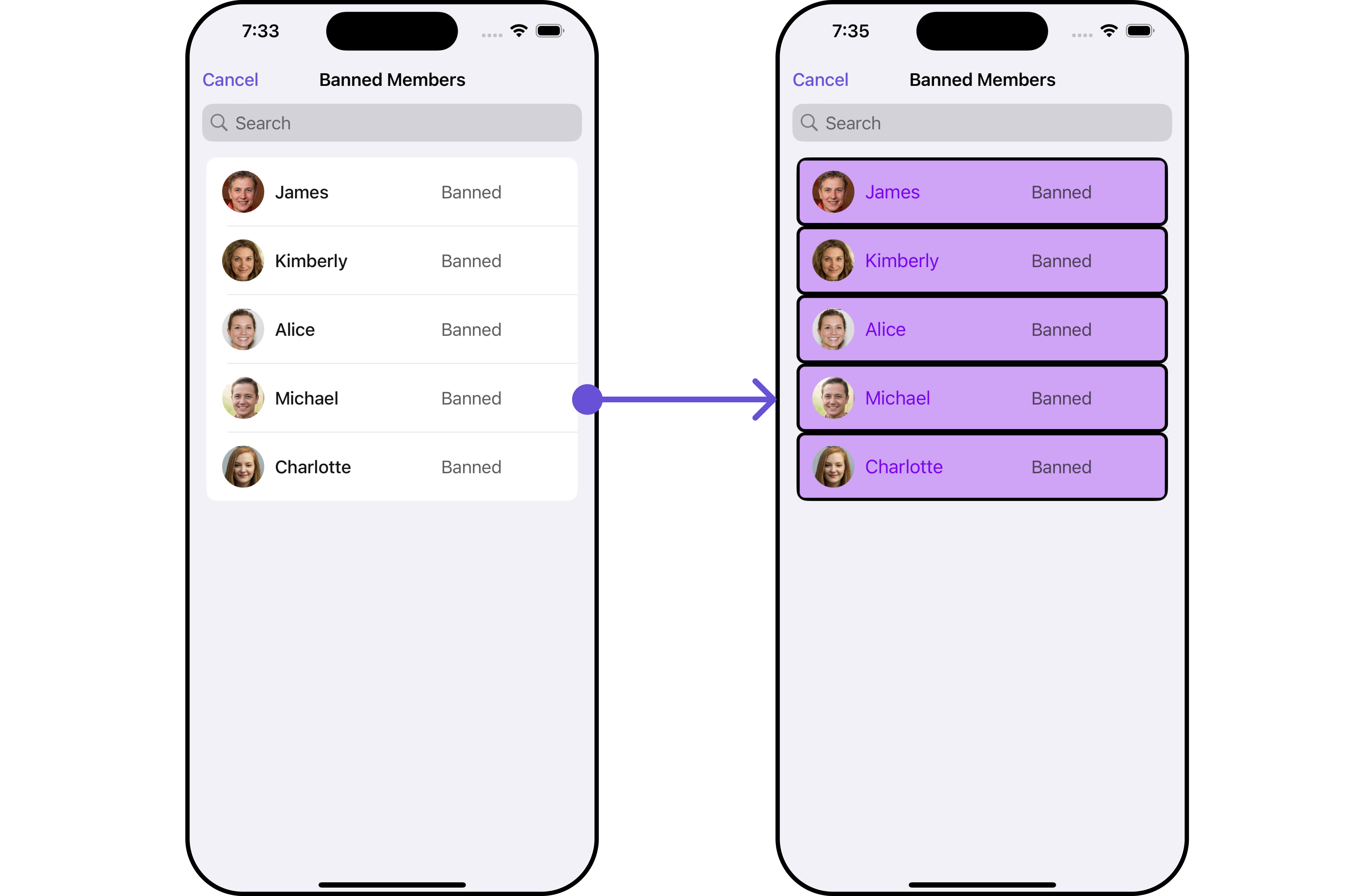 ```swift theme={null}
let group = Group(guid: "your UID", name: "", groupType: .public, password: .none)
// Creating ListItemStyle object
let listItemStyle = ListItemStyle()
listItemStyle.set(background: .init(red: 0.81, green: 0.64, blue: 0.96, alpha: 1.00))
.set(titleFont: .systemFont(ofSize: 18))
.set(titleColor: .init(red: 0.47, green: 0.02, blue: 0.93, alpha: 1.00))
.set(cornerRadius: CometChatCornerStyle(cornerRadius: 8.0))
.set(borderColor: .black)
.set(borderWidth: 3)
let cometChatBannedMembers = CometChatBannedMembers(group: group)
cometChatBannedMembers.set(listItemStyle: listItemStyle)
```
***
### Functionality
These are a set of small functional customizations that allow you to fine-tune the overall experience of the component. With these, you can change text, set custom icons, and toggle the visibility of UI elements.
```swift theme={null}
let group = Group(guid: "your UID", name: "", groupType: .public, password: .none)
let cometChatBannedMembers = CometChatBannedMembers(group: group)
.set(title: "Cc", mode: .always)
.hide(separator: true)
.disable(userPresence: true)
```
Below is a list of customizations along with corresponding code snippets
| Property | Description | Code |
| --------------------------------------------------- | ---------------------------------------------------------------- | ------------------------------------------------------------------- |
| **Title** 🛑 | Custom title for the component | `.set(title: String, mode: UINavigationItem.LargeTitleDisplayMode)` |
| **BackButtonTitle** | Custom text for the back button | `.set(backButtonTitle: String?)` |
| **SearchPlaceholderText** | Custom placeholder text for search field | `.set(searchPlaceholder: String)` |
| **ShowBackButton** | Whether to hide the back button | `.show(backButton: Bool)` |
| **ErrorStateText** | Custom error state text | `.set(errorStateText: String)` |
| **BackButtonIcon** | Custom back button icon | `.set(backButtonIcon: UIImage)` |
| **HideAddButton** | Whether to hide the add button | `.hide(addButton: Bool)` |
| **SearchPlaceholder** | Set the placeholder for search bar | `set(searchPlaceholder: String)` |
| **SearchIcon** | Sets the icon for the search bar | `set(searchIcon:UIImage)` |
| **SearchClearIcon** | Sets the clear icon for the search bar | `set(searchClearIcon:UIImage)` |
| **SearchBarHeight** | Set the height for the search bar | `set(searchBarHeight: CGFloat)` |
| **HideSearch** | Hide / unhide the search bar as per boolean value | `hide(search: Bool)` |
| **SelectionMode** | This enables a selection, it has three modes: .single, .multiple | `selectionMode(mode: SelectionMode)` |
| **HideSeparator** | This method will hide the separator | `hide(separator: Bool)` |
| **DisableUserPresence** | This method disables user's online/offline status | `disable(userPresence: Bool)` |
| **UpdateGroupMember** | This method specifies the option to update member object locally | `update(groupMember: GroupMember)` |
| **RemoveGroupMember** | This method specifies the option to remove member object locally | `remove(groupMember: GroupMember)` |
| **AddGroupMember** | This method specifies the option to add member object locally | `update(groupMember: GroupMember)` |
| **RemoveGroupMember** | This method specifies the option to remove member object locally | `remove(groupMember: GroupMember)` |
| **ClearList** | This method will clear the users locally | `clearList()` |
| **GetSize** | This method specifies the count of members displayed | `size()` |
Ensure to include your GUID and the name of your group when configuring group settings.
***
### Advance
For advanced-level customization, you can set custom views to the component. This lets you tailor each aspect of the component to fit your exact needs and application aesthetics. You can create and define your views, layouts, and UI elements and then incorporate those into the component.
#### ListItemView
Utilize this property to assign a custom ListItem to the Banned Members Component, allowing for enhanced customization and flexibility in its rendering.
```swift theme={null}
let group = Group(guid: "your-uid", name: "", groupType: .public, password: .none)
let cometChatBannedMembers = CometChatBannedMembers(group: group)
.setListItemView { groupMember in
//Perform Your Action
}
```
**Example**
```swift theme={null}
let group = Group(guid: "your UID", name: "", groupType: .public, password: .none)
// Creating ListItemStyle object
let listItemStyle = ListItemStyle()
listItemStyle.set(background: .init(red: 0.81, green: 0.64, blue: 0.96, alpha: 1.00))
.set(titleFont: .systemFont(ofSize: 18))
.set(titleColor: .init(red: 0.47, green: 0.02, blue: 0.93, alpha: 1.00))
.set(cornerRadius: CometChatCornerStyle(cornerRadius: 8.0))
.set(borderColor: .black)
.set(borderWidth: 3)
let cometChatBannedMembers = CometChatBannedMembers(group: group)
cometChatBannedMembers.set(listItemStyle: listItemStyle)
```
***
### Functionality
These are a set of small functional customizations that allow you to fine-tune the overall experience of the component. With these, you can change text, set custom icons, and toggle the visibility of UI elements.
```swift theme={null}
let group = Group(guid: "your UID", name: "", groupType: .public, password: .none)
let cometChatBannedMembers = CometChatBannedMembers(group: group)
.set(title: "Cc", mode: .always)
.hide(separator: true)
.disable(userPresence: true)
```
Below is a list of customizations along with corresponding code snippets
| Property | Description | Code |
| --------------------------------------------------- | ---------------------------------------------------------------- | ------------------------------------------------------------------- |
| **Title** 🛑 | Custom title for the component | `.set(title: String, mode: UINavigationItem.LargeTitleDisplayMode)` |
| **BackButtonTitle** | Custom text for the back button | `.set(backButtonTitle: String?)` |
| **SearchPlaceholderText** | Custom placeholder text for search field | `.set(searchPlaceholder: String)` |
| **ShowBackButton** | Whether to hide the back button | `.show(backButton: Bool)` |
| **ErrorStateText** | Custom error state text | `.set(errorStateText: String)` |
| **BackButtonIcon** | Custom back button icon | `.set(backButtonIcon: UIImage)` |
| **HideAddButton** | Whether to hide the add button | `.hide(addButton: Bool)` |
| **SearchPlaceholder** | Set the placeholder for search bar | `set(searchPlaceholder: String)` |
| **SearchIcon** | Sets the icon for the search bar | `set(searchIcon:UIImage)` |
| **SearchClearIcon** | Sets the clear icon for the search bar | `set(searchClearIcon:UIImage)` |
| **SearchBarHeight** | Set the height for the search bar | `set(searchBarHeight: CGFloat)` |
| **HideSearch** | Hide / unhide the search bar as per boolean value | `hide(search: Bool)` |
| **SelectionMode** | This enables a selection, it has three modes: .single, .multiple | `selectionMode(mode: SelectionMode)` |
| **HideSeparator** | This method will hide the separator | `hide(separator: Bool)` |
| **DisableUserPresence** | This method disables user's online/offline status | `disable(userPresence: Bool)` |
| **UpdateGroupMember** | This method specifies the option to update member object locally | `update(groupMember: GroupMember)` |
| **RemoveGroupMember** | This method specifies the option to remove member object locally | `remove(groupMember: GroupMember)` |
| **AddGroupMember** | This method specifies the option to add member object locally | `update(groupMember: GroupMember)` |
| **RemoveGroupMember** | This method specifies the option to remove member object locally | `remove(groupMember: GroupMember)` |
| **ClearList** | This method will clear the users locally | `clearList()` |
| **GetSize** | This method specifies the count of members displayed | `size()` |
Ensure to include your GUID and the name of your group when configuring group settings.
***
### Advance
For advanced-level customization, you can set custom views to the component. This lets you tailor each aspect of the component to fit your exact needs and application aesthetics. You can create and define your views, layouts, and UI elements and then incorporate those into the component.
#### ListItemView
Utilize this property to assign a custom ListItem to the Banned Members Component, allowing for enhanced customization and flexibility in its rendering.
```swift theme={null}
let group = Group(guid: "your-uid", name: "", groupType: .public, password: .none)
let cometChatBannedMembers = CometChatBannedMembers(group: group)
.setListItemView { groupMember in
//Perform Your Action
}
```
**Example**
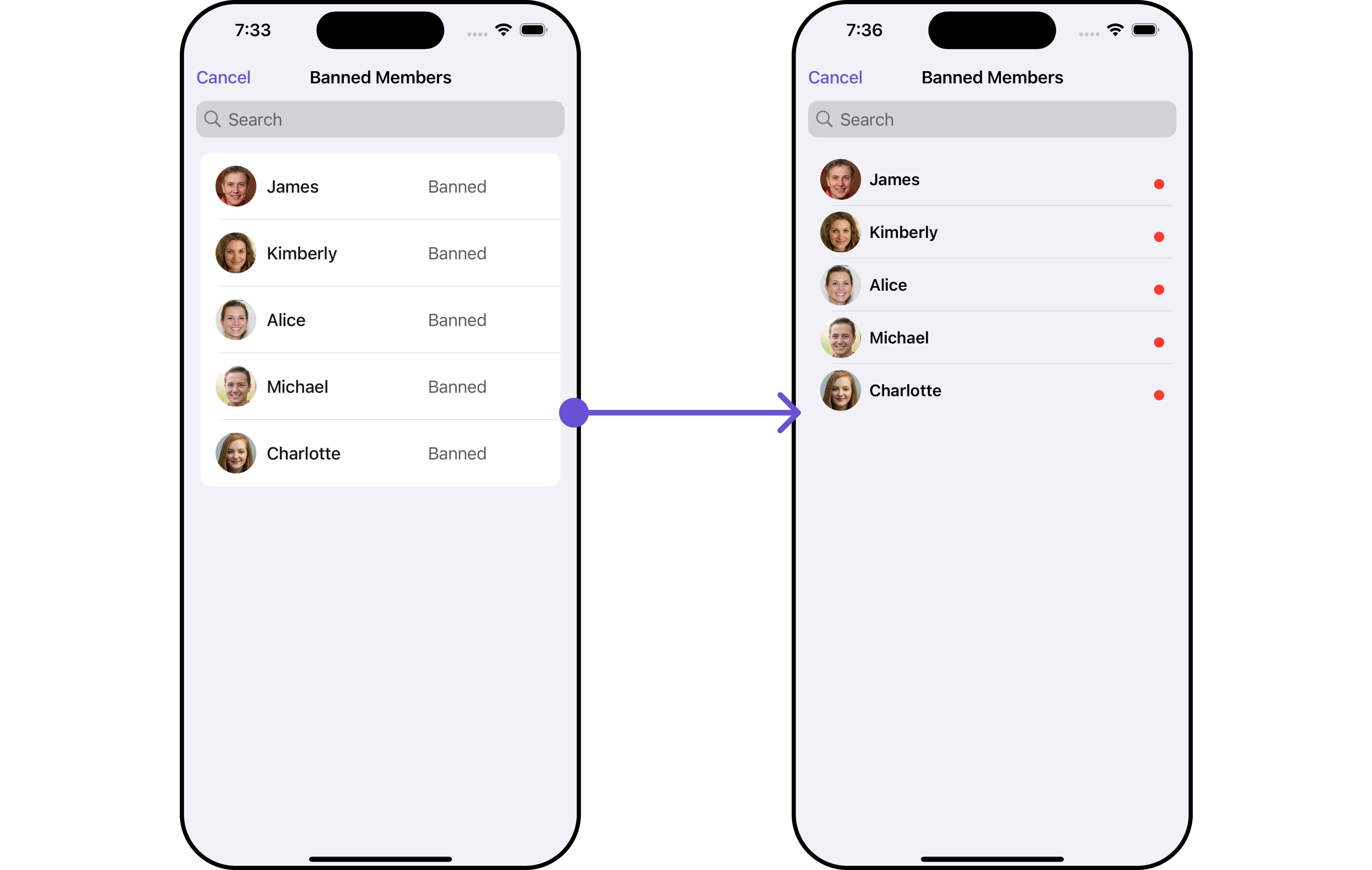 In this example, we will create a UIView file `CustomListItemGroupView` and pass it inside the `setListItemView()` method.
```swift CustomListItemGroupView theme={null}
import UIKit
import CometChatSDK
import CometChatUIKitSwift
class CustomListItemGroupView: UIView {
// Initialize your subviews
let titleLabel: UILabel = {
let label = UILabel()
label.translatesAutoresizingMaskIntoConstraints = false
label.font = UIFont.boldSystemFont(ofSize: 16)
return label
}()
let statusIndicator: UIView = {
let view = UIView()
view.translatesAutoresizingMaskIntoConstraints = false
view.backgroundColor = .systemRed
view.layer.cornerRadius = 5
return view
}()
let groupImageView: CometChatAvatar = {
let imageView = CometChatAvatar(frame: .zero)
imageView.translatesAutoresizingMaskIntoConstraints = false
return imageView
}()
// Override the initializer
override init(frame: CGRect) {
super.init(frame: frame)
// Add subviews and layout constraints
addSubview(groupImageView)
addSubview(titleLabel)
addSubview(statusIndicator)
NSLayoutConstraint.activate([
groupImageView.leadingAnchor.constraint(equalTo: leadingAnchor, constant: 8),
groupImageView.centerYAnchor.constraint(equalTo: centerYAnchor),
groupImageView.heightAnchor.constraint(equalToConstant: 40),
groupImageView.widthAnchor.constraint(equalToConstant: 40),
titleLabel.centerYAnchor.constraint(equalTo: centerYAnchor),
titleLabel.leadingAnchor.constraint(equalTo: groupImageView.trailingAnchor, constant: 8),
titleLabel.trailingAnchor.constraint(equalTo: trailingAnchor, constant: -8),
statusIndicator.widthAnchor.constraint(equalToConstant: 10),
statusIndicator.heightAnchor.constraint(equalToConstant: 10),
statusIndicator.trailingAnchor.constraint(equalTo: titleLabel.trailingAnchor),
statusIndicator.bottomAnchor.constraint(equalTo: titleLabel.bottomAnchor)
])
}
required init?(coder: NSCoder) {
fatalError("init(coder:) has not been implemented")
}
func configure(with user: User) {
titleLabel.text = user.name
if let avatarUrl = user.avatar {
groupImageView.setAvatar(avatarUrl: avatarUrl, with: user.name ?? "")
} else {
// handle when avatar is nil
}
}
}
```
```swift theme={null}
let group = Group(guid: "your-uid", name: "", groupType: .public, password: .none)
let cometChatBannedMembers = CometChatBannedMembers(group: group)
.setListItemView { user in
let customListItemGroupView = CustomListItemGroupView()
customListItemGroupView.configure(with: user!)
return customListItemGroupView
}
```
Ensure to pass and present `CometChatBannedMembers`. If a navigation controller is already in use, utilize the pushViewController function instead of directly presenting the view controller.
***
#### SubtitleView
You can set your custom Subtitle view using the `.setSubtitleView()` method. But keep in mind, by using this you will override the default Subtitle view functionality.
```swift theme={null}
let group = Group(guid: "your-uid", name: "", groupType: .public, password: .none)
let cometChatBannedMembers = CometChatBannedMembers(group: group)
.setSubtitle { groupMember in
//Perform Your Action
}
```
* You can customize the subtitle view for each BannedMembers item to meet your requirements
**Example**
In this example, we will create a UIView file `CustomListItemGroupView` and pass it inside the `setListItemView()` method.
```swift CustomListItemGroupView theme={null}
import UIKit
import CometChatSDK
import CometChatUIKitSwift
class CustomListItemGroupView: UIView {
// Initialize your subviews
let titleLabel: UILabel = {
let label = UILabel()
label.translatesAutoresizingMaskIntoConstraints = false
label.font = UIFont.boldSystemFont(ofSize: 16)
return label
}()
let statusIndicator: UIView = {
let view = UIView()
view.translatesAutoresizingMaskIntoConstraints = false
view.backgroundColor = .systemRed
view.layer.cornerRadius = 5
return view
}()
let groupImageView: CometChatAvatar = {
let imageView = CometChatAvatar(frame: .zero)
imageView.translatesAutoresizingMaskIntoConstraints = false
return imageView
}()
// Override the initializer
override init(frame: CGRect) {
super.init(frame: frame)
// Add subviews and layout constraints
addSubview(groupImageView)
addSubview(titleLabel)
addSubview(statusIndicator)
NSLayoutConstraint.activate([
groupImageView.leadingAnchor.constraint(equalTo: leadingAnchor, constant: 8),
groupImageView.centerYAnchor.constraint(equalTo: centerYAnchor),
groupImageView.heightAnchor.constraint(equalToConstant: 40),
groupImageView.widthAnchor.constraint(equalToConstant: 40),
titleLabel.centerYAnchor.constraint(equalTo: centerYAnchor),
titleLabel.leadingAnchor.constraint(equalTo: groupImageView.trailingAnchor, constant: 8),
titleLabel.trailingAnchor.constraint(equalTo: trailingAnchor, constant: -8),
statusIndicator.widthAnchor.constraint(equalToConstant: 10),
statusIndicator.heightAnchor.constraint(equalToConstant: 10),
statusIndicator.trailingAnchor.constraint(equalTo: titleLabel.trailingAnchor),
statusIndicator.bottomAnchor.constraint(equalTo: titleLabel.bottomAnchor)
])
}
required init?(coder: NSCoder) {
fatalError("init(coder:) has not been implemented")
}
func configure(with user: User) {
titleLabel.text = user.name
if let avatarUrl = user.avatar {
groupImageView.setAvatar(avatarUrl: avatarUrl, with: user.name ?? "")
} else {
// handle when avatar is nil
}
}
}
```
```swift theme={null}
let group = Group(guid: "your-uid", name: "", groupType: .public, password: .none)
let cometChatBannedMembers = CometChatBannedMembers(group: group)
.setListItemView { user in
let customListItemGroupView = CustomListItemGroupView()
customListItemGroupView.configure(with: user!)
return customListItemGroupView
}
```
Ensure to pass and present `CometChatBannedMembers`. If a navigation controller is already in use, utilize the pushViewController function instead of directly presenting the view controller.
***
#### SubtitleView
You can set your custom Subtitle view using the `.setSubtitleView()` method. But keep in mind, by using this you will override the default Subtitle view functionality.
```swift theme={null}
let group = Group(guid: "your-uid", name: "", groupType: .public, password: .none)
let cometChatBannedMembers = CometChatBannedMembers(group: group)
.setSubtitle { groupMember in
//Perform Your Action
}
```
* You can customize the subtitle view for each BannedMembers item to meet your requirements
**Example**
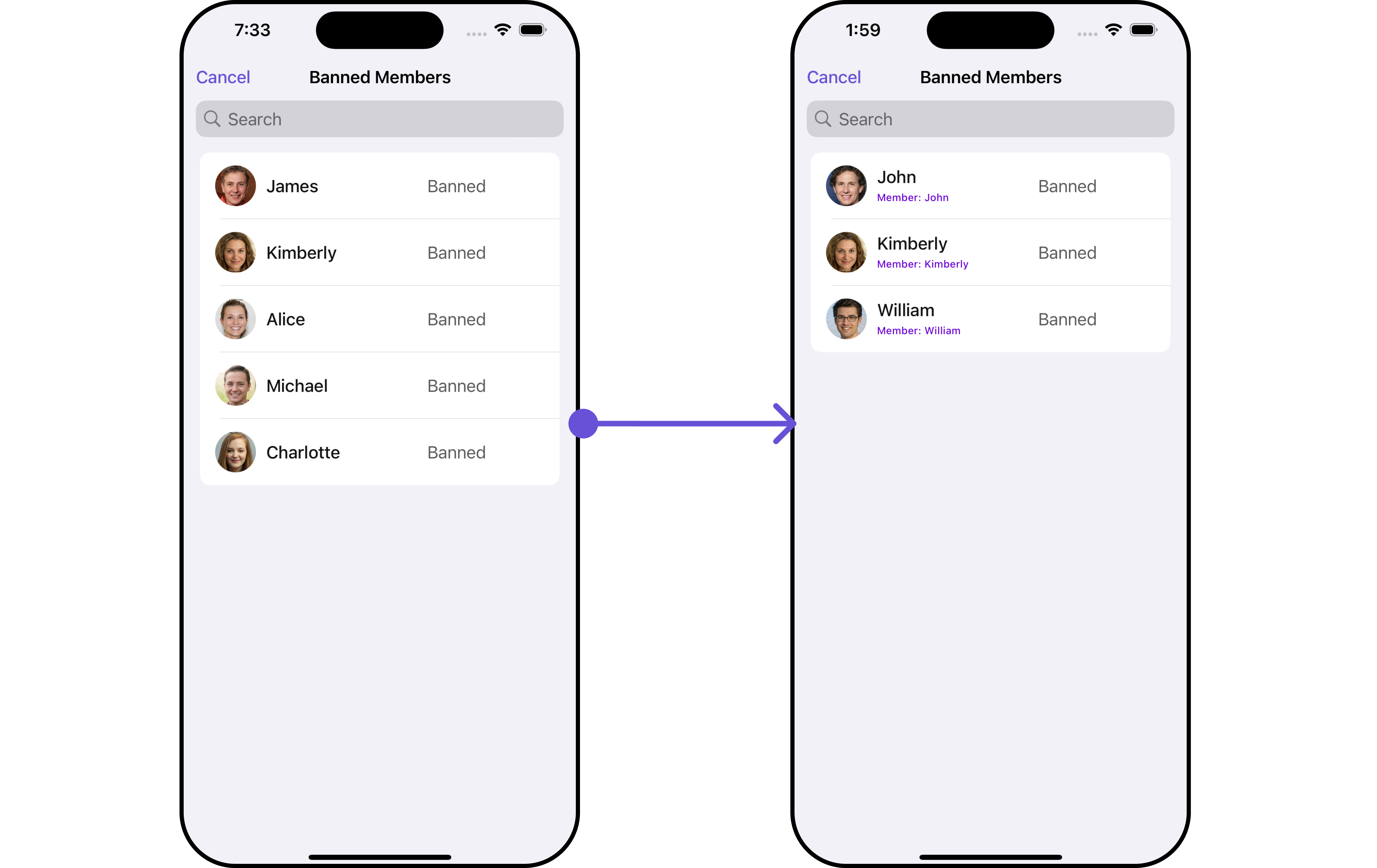 In this example, we will create a `Custom_Subtitle_GroupMember_View`a UIView file.
```swift Custom_Subtitle_GroupMember_View theme={null}
import UIKit
import CometChatSDK
import CometChatUIKitSwift
class CustomSubtitleGroupMemberView: UIView {
let memberNameLabel: UILabel = {
let label = UILabel()
label.translatesAutoresizingMaskIntoConstraints = false
label.textColor = .init(red: 0.42, green: 0.01, blue: 0.84, alpha: 1.00)
label.font = UIFont.systemFont(ofSize: 10, weight: .medium)
return label
}()
let joinedAtLabel: UILabel = {
let label = UILabel()
label.translatesAutoresizingMaskIntoConstraints = false
label.textColor = .systemBrown
label.font = UIFont.systemFont(ofSize: 10, weight: .medium)
return label
}()
override init(frame: CGRect) {
super.init(frame: frame)
addSubview(memberNameLabel)
addSubview(joinedAtLabel)
NSLayoutConstraint.activate([
memberNameLabel.topAnchor.constraint(equalTo: topAnchor),
memberNameLabel.leadingAnchor.constraint(equalTo: leadingAnchor),
memberNameLabel.trailingAnchor.constraint(equalTo: trailingAnchor),
joinedAtLabel.topAnchor.constraint(equalTo: memberNameLabel.bottomAnchor, constant: 2),
joinedAtLabel.leadingAnchor.constraint(equalTo: leadingAnchor),
joinedAtLabel.trailingAnchor.constraint(equalTo: trailingAnchor),
joinedAtLabel.bottomAnchor.constraint(equalTo: bottomAnchor)
])
}
required init?(coder: NSCoder) {
fatalError("init(coder:) has not been implemented")
}
func configure(with user: User) {
memberNameLabel.text = "Member: \(user.name ?? "")"
}
}
```
We will be passing a custom subtitle view to CometChatBannedMembers, ensuring a tailored and user-friendly interface.
```swift theme={null}
let group = Group(guid: "your-uid", name: "", groupType: .public, password: .none)
let cometChatBannedMembers = CometChatBannedMembers(group: group)
.setSubtitle { user in
let customSubtitleGroupMemberView = CustomSubtitleGroupMemberView()
customSubtitleGroupMemberView.configure(with: user!)
return customSubtitleGroupMemberView
}
```
Ensure to pass and present `CometChatBannedMembers`. If a navigation controller is already in use, utilize the pushViewController function instead of directly presenting the view controller.
***
#### EmptyView report
You can set a custom EmptyView using `.set(emptyView: UIView)` to match the empty view of your app.
```swift theme={null}
let group = Group(guid: "your-uid", name: "", groupType: .public, password: .none)
let cometChatBannedMembers = CometChatBannedMembers(group: group)
.set(emptyView: UIView)
```
**Example**
In this example, we will create a `Custom_Empty_State_GroupView`a UIView file.
```swift theme={null}
import UIKit
class CustomEmptyStateGroupView: UIView {
// Initialize your subviews
let imageView: UIImageView = {
let imageView = UIImageView(image: UIImage(named: "noDataImage"))
imageView.translatesAutoresizingMaskIntoConstraints = false
return imageView
}()
let messageLabel: UILabel = {
let label = UILabel()
label.text = "No groups available"
label.translatesAutoresizingMaskIntoConstraints = false
label.font = UIFont.boldSystemFont(ofSize: 16)
label.textColor = .black
return label
}()
// Override the initializer
override init(frame: CGRect) {
super.init(frame: frame)
// Add subviews and layout constraints
addSubview(imageView)
addSubview(messageLabel)
NSLayoutConstraint.activate([
imageView.centerXAnchor.constraint(equalTo: centerXAnchor),
imageView.centerYAnchor.constraint(equalTo: centerYAnchor),
imageView.heightAnchor.constraint(equalToConstant: 120),
imageView.widthAnchor.constraint(equalToConstant: 120),
messageLabel.topAnchor.constraint(equalTo: imageView.bottomAnchor, constant: 8),
messageLabel.centerXAnchor.constraint(equalTo: centerXAnchor)
])
}
required init?(coder: NSCoder) {
fatalError("init(coder:) has not been implemented")
}
}
```
We will be passing a custom empty view to CometChatBannedMembers, ensuring a tailored and user-friendly interface.
```swift theme={null}
let group = Group(guid: "your-uid", name: "", groupType: .public, password: .none)
let customEmptyStateGroupView = CustomEmptyStateGroupView()
let bannedGroupMembersRequestBuilder = BannedGroupMembersRequest.BannedGroupMembersRequestBuilder(guid: group.guid).set(limit: 1000)
let cometChatBannedMembers = CometChatBannedMembers(group: group, bannedGroupMembersRequestBuilder: bannedGroupMembersRequestBuilder)
.set(emptyView: customEmptyStateGroupView)
```
Ensure to pass and present `CometChatBannedMembers`. If a navigation controller is already in use, utilize the pushViewController function instead of directly presenting the view controller.
***
#### ErrorView
You can set a custom ErrorView using `.set(errorView: UIView)` to match the error view of your app.
```swift theme={null}
let group = Group(guid: "your-uid", name: "", groupType: .public, password: .none)
let cometChatBannedMembers = CometChatBannedMembers(group: group)
.set(errorView: UIView)
```
**Example**
In this example, we will create a `Custom_Subtitle_GroupMember_View`a UIView file.
```swift Custom_Subtitle_GroupMember_View theme={null}
import UIKit
import CometChatSDK
import CometChatUIKitSwift
class CustomSubtitleGroupMemberView: UIView {
let memberNameLabel: UILabel = {
let label = UILabel()
label.translatesAutoresizingMaskIntoConstraints = false
label.textColor = .init(red: 0.42, green: 0.01, blue: 0.84, alpha: 1.00)
label.font = UIFont.systemFont(ofSize: 10, weight: .medium)
return label
}()
let joinedAtLabel: UILabel = {
let label = UILabel()
label.translatesAutoresizingMaskIntoConstraints = false
label.textColor = .systemBrown
label.font = UIFont.systemFont(ofSize: 10, weight: .medium)
return label
}()
override init(frame: CGRect) {
super.init(frame: frame)
addSubview(memberNameLabel)
addSubview(joinedAtLabel)
NSLayoutConstraint.activate([
memberNameLabel.topAnchor.constraint(equalTo: topAnchor),
memberNameLabel.leadingAnchor.constraint(equalTo: leadingAnchor),
memberNameLabel.trailingAnchor.constraint(equalTo: trailingAnchor),
joinedAtLabel.topAnchor.constraint(equalTo: memberNameLabel.bottomAnchor, constant: 2),
joinedAtLabel.leadingAnchor.constraint(equalTo: leadingAnchor),
joinedAtLabel.trailingAnchor.constraint(equalTo: trailingAnchor),
joinedAtLabel.bottomAnchor.constraint(equalTo: bottomAnchor)
])
}
required init?(coder: NSCoder) {
fatalError("init(coder:) has not been implemented")
}
func configure(with user: User) {
memberNameLabel.text = "Member: \(user.name ?? "")"
}
}
```
We will be passing a custom subtitle view to CometChatBannedMembers, ensuring a tailored and user-friendly interface.
```swift theme={null}
let group = Group(guid: "your-uid", name: "", groupType: .public, password: .none)
let cometChatBannedMembers = CometChatBannedMembers(group: group)
.setSubtitle { user in
let customSubtitleGroupMemberView = CustomSubtitleGroupMemberView()
customSubtitleGroupMemberView.configure(with: user!)
return customSubtitleGroupMemberView
}
```
Ensure to pass and present `CometChatBannedMembers`. If a navigation controller is already in use, utilize the pushViewController function instead of directly presenting the view controller.
***
#### EmptyView report
You can set a custom EmptyView using `.set(emptyView: UIView)` to match the empty view of your app.
```swift theme={null}
let group = Group(guid: "your-uid", name: "", groupType: .public, password: .none)
let cometChatBannedMembers = CometChatBannedMembers(group: group)
.set(emptyView: UIView)
```
**Example**
In this example, we will create a `Custom_Empty_State_GroupView`a UIView file.
```swift theme={null}
import UIKit
class CustomEmptyStateGroupView: UIView {
// Initialize your subviews
let imageView: UIImageView = {
let imageView = UIImageView(image: UIImage(named: "noDataImage"))
imageView.translatesAutoresizingMaskIntoConstraints = false
return imageView
}()
let messageLabel: UILabel = {
let label = UILabel()
label.text = "No groups available"
label.translatesAutoresizingMaskIntoConstraints = false
label.font = UIFont.boldSystemFont(ofSize: 16)
label.textColor = .black
return label
}()
// Override the initializer
override init(frame: CGRect) {
super.init(frame: frame)
// Add subviews and layout constraints
addSubview(imageView)
addSubview(messageLabel)
NSLayoutConstraint.activate([
imageView.centerXAnchor.constraint(equalTo: centerXAnchor),
imageView.centerYAnchor.constraint(equalTo: centerYAnchor),
imageView.heightAnchor.constraint(equalToConstant: 120),
imageView.widthAnchor.constraint(equalToConstant: 120),
messageLabel.topAnchor.constraint(equalTo: imageView.bottomAnchor, constant: 8),
messageLabel.centerXAnchor.constraint(equalTo: centerXAnchor)
])
}
required init?(coder: NSCoder) {
fatalError("init(coder:) has not been implemented")
}
}
```
We will be passing a custom empty view to CometChatBannedMembers, ensuring a tailored and user-friendly interface.
```swift theme={null}
let group = Group(guid: "your-uid", name: "", groupType: .public, password: .none)
let customEmptyStateGroupView = CustomEmptyStateGroupView()
let bannedGroupMembersRequestBuilder = BannedGroupMembersRequest.BannedGroupMembersRequestBuilder(guid: group.guid).set(limit: 1000)
let cometChatBannedMembers = CometChatBannedMembers(group: group, bannedGroupMembersRequestBuilder: bannedGroupMembersRequestBuilder)
.set(emptyView: customEmptyStateGroupView)
```
Ensure to pass and present `CometChatBannedMembers`. If a navigation controller is already in use, utilize the pushViewController function instead of directly presenting the view controller.
***
#### ErrorView
You can set a custom ErrorView using `.set(errorView: UIView)` to match the error view of your app.
```swift theme={null}
let group = Group(guid: "your-uid", name: "", groupType: .public, password: .none)
let cometChatBannedMembers = CometChatBannedMembers(group: group)
.set(errorView: UIView)
```
**Example**
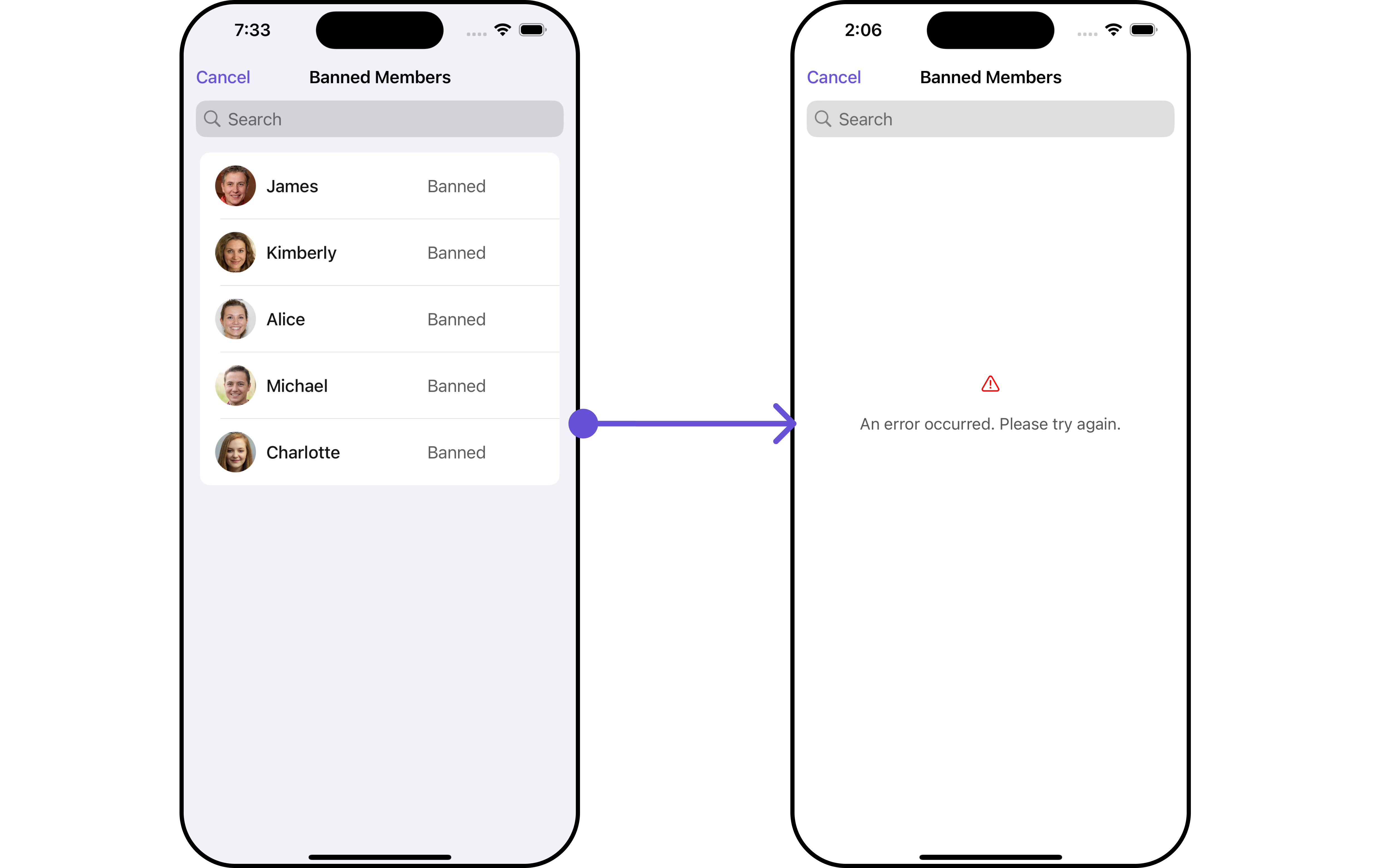 In this example, we will create a UIView file `Custom_ErrorState_GroupView` and pass it inside the `.set(errorView: UIView)` method.
```swift Custom_ErrorState_GroupView theme={null}
import UIKit
let CustomErrorStateGroupView: UIView = {
// Create main view
let view = UIView()
view.backgroundColor = .white
// Create an imageView and add it to the main view
let imageView = UIImageView(image: UIImage(systemName: "exclamationmark.triangle"))
imageView.tintColor = .red
imageView.translatesAutoresizingMaskIntoConstraints = false
view.addSubview(imageView)
// Create a label with error message and add it to the main view
let label = UILabel()
label.text = "An error occurred. Please try again."
label.font = UIFont.systemFont(ofSize: 16)
label.textColor = .darkGray
label.numberOfLines = 0
label.textAlignment = .center
label.translatesAutoresizingMaskIntoConstraints = false
view.addSubview(label)
// Create constraints for imageView and label
NSLayoutConstraint.activate([
imageView.centerXAnchor.constraint(equalTo: view.centerXAnchor),
imageView.centerYAnchor.constraint(equalTo: view.centerYAnchor, constant: -50),
label.topAnchor.constraint(equalTo: imageView.bottomAnchor, constant: 20),
label.leadingAnchor.constraint(equalTo: view.leadingAnchor, constant: 20),
label.trailingAnchor.constraint(equalTo: view.trailingAnchor, constant: -20)
])
return view
}()
```
```swift theme={null}
let group = Group(guid: "your_guid", name: "", groupType: .public, password: .none)
let customErrorStateGroupView = CustomErrorStateGroupView
let bannedGroupMembersRequestBuilder = BannedGroupMembersRequest.BannedGroupMembersRequestBuilder(guid: group.guid).set(limit: 1000)
let cometChatBannedMembers = CometChatBannedMembers(group: group, bannedGroupMembersRequestBuilder: bannedGroupMembersRequestBuilder)
.set(errorView: customErrorStateGroupView)
```
Ensure to pass and present `CometChatBannedMembers`. If a navigation controller is already in use, utilize the pushViewController function instead of directly presenting the view controller.
***
#### Menus
You can set the Custom Menus to add more options to the BannedMembers component.
```swift theme={null}
let group = Group(guid: "your-uid", name: "", groupType: .public, password: .none)
let cometChatBannedMembers = CometChatBannedMembers(group: group)
.set(menus: [UIBarButtonItem])
```
* You can customize the menus for BannedMembers to meet your requirements
**Example**
In this example, we will create a UIView file `Custom_ErrorState_GroupView` and pass it inside the `.set(errorView: UIView)` method.
```swift Custom_ErrorState_GroupView theme={null}
import UIKit
let CustomErrorStateGroupView: UIView = {
// Create main view
let view = UIView()
view.backgroundColor = .white
// Create an imageView and add it to the main view
let imageView = UIImageView(image: UIImage(systemName: "exclamationmark.triangle"))
imageView.tintColor = .red
imageView.translatesAutoresizingMaskIntoConstraints = false
view.addSubview(imageView)
// Create a label with error message and add it to the main view
let label = UILabel()
label.text = "An error occurred. Please try again."
label.font = UIFont.systemFont(ofSize: 16)
label.textColor = .darkGray
label.numberOfLines = 0
label.textAlignment = .center
label.translatesAutoresizingMaskIntoConstraints = false
view.addSubview(label)
// Create constraints for imageView and label
NSLayoutConstraint.activate([
imageView.centerXAnchor.constraint(equalTo: view.centerXAnchor),
imageView.centerYAnchor.constraint(equalTo: view.centerYAnchor, constant: -50),
label.topAnchor.constraint(equalTo: imageView.bottomAnchor, constant: 20),
label.leadingAnchor.constraint(equalTo: view.leadingAnchor, constant: 20),
label.trailingAnchor.constraint(equalTo: view.trailingAnchor, constant: -20)
])
return view
}()
```
```swift theme={null}
let group = Group(guid: "your_guid", name: "", groupType: .public, password: .none)
let customErrorStateGroupView = CustomErrorStateGroupView
let bannedGroupMembersRequestBuilder = BannedGroupMembersRequest.BannedGroupMembersRequestBuilder(guid: group.guid).set(limit: 1000)
let cometChatBannedMembers = CometChatBannedMembers(group: group, bannedGroupMembersRequestBuilder: bannedGroupMembersRequestBuilder)
.set(errorView: customErrorStateGroupView)
```
Ensure to pass and present `CometChatBannedMembers`. If a navigation controller is already in use, utilize the pushViewController function instead of directly presenting the view controller.
***
#### Menus
You can set the Custom Menus to add more options to the BannedMembers component.
```swift theme={null}
let group = Group(guid: "your-uid", name: "", groupType: .public, password: .none)
let cometChatBannedMembers = CometChatBannedMembers(group: group)
.set(menus: [UIBarButtonItem])
```
* You can customize the menus for BannedMembers to meet your requirements
**Example**
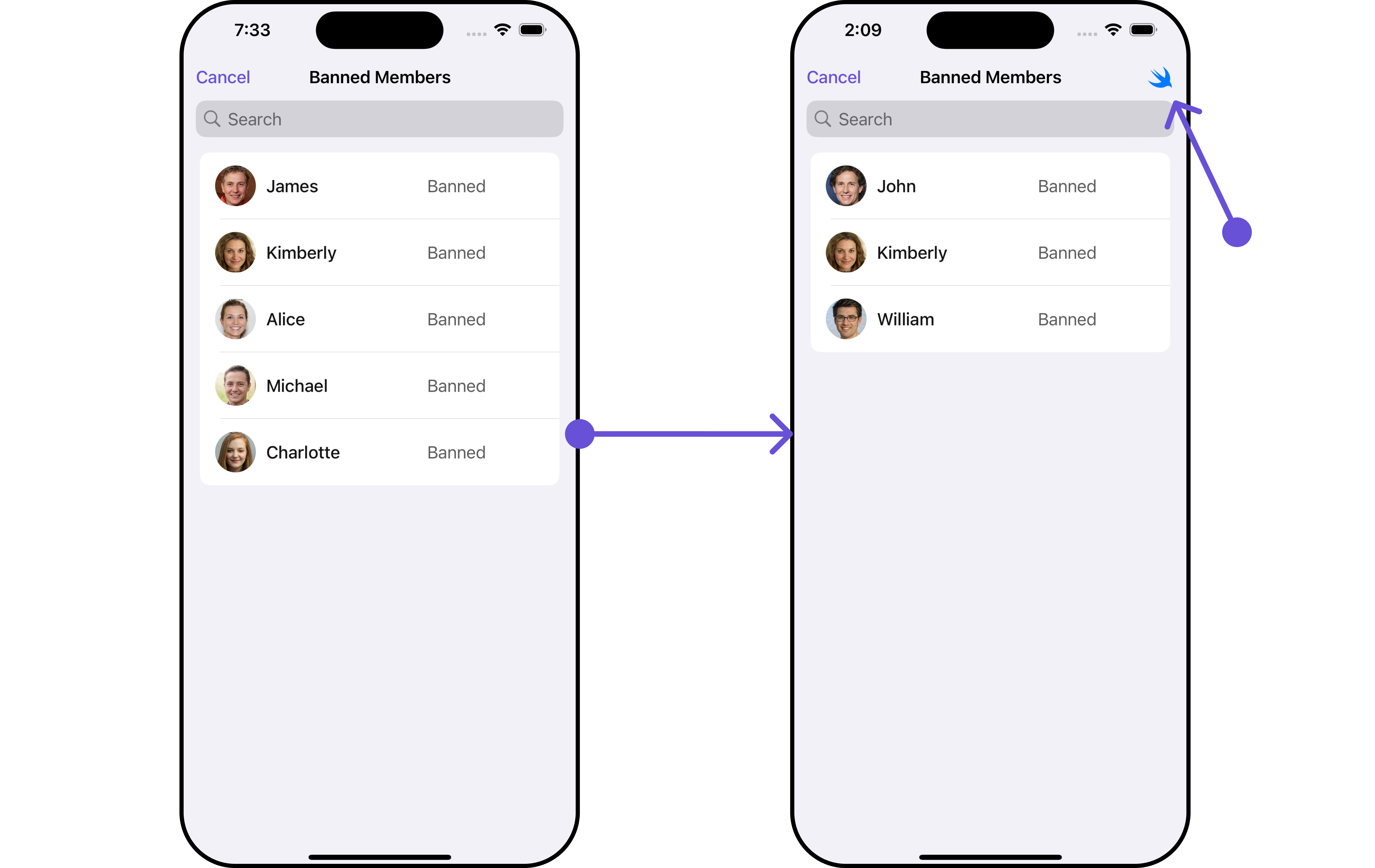 In this example, we'll craft a custom button tailored for `CometChatBannedMembers`, enhancing its interface with a personalized `menu` for a more user-friendly experience.
```swift theme={null}
let customMenuButton: UIBarButtonItem = {
let button = UIButton(type: .system)
button.setImage(UIImage(systemName: "swift"), for: .normal)
button.setTitle("", for: .normal)
button.addTarget(self, action: #selector(handleCustomMenu), for: .touchUpInside)
let barButtonItem = UIBarButtonItem(customView: button)
return barButtonItem
}()
let cometChatBannedMembers = CometChatBannedMembers(group: group)
.set(menus: [customMenuButton])
```
Ensure to pass and present `CometChatBannedMembers`. If a navigation controller is already in use, utilize the pushViewController function instead of directly presenting the view controller.
***
#### Options
Enhance your BannedMembers component by setting Custom Options to incorporate additional functionalities when swiping
```swift theme={null}
let group = Group(guid: "your-uid", name: "", groupType: .public, password: .none)
let cometChatBannedMembers = CometChatBannedMembers(group: group)
.setOptions { group, groupMember in
//Perform Your Action
}
```
* You can customize the options for BannedMembers to meet your requirements
**Example**
In this example, we'll craft a custom button tailored for `CometChatBannedMembers`, enhancing its interface with a personalized `menu` for a more user-friendly experience.
```swift theme={null}
let customMenuButton: UIBarButtonItem = {
let button = UIButton(type: .system)
button.setImage(UIImage(systemName: "swift"), for: .normal)
button.setTitle("", for: .normal)
button.addTarget(self, action: #selector(handleCustomMenu), for: .touchUpInside)
let barButtonItem = UIBarButtonItem(customView: button)
return barButtonItem
}()
let cometChatBannedMembers = CometChatBannedMembers(group: group)
.set(menus: [customMenuButton])
```
Ensure to pass and present `CometChatBannedMembers`. If a navigation controller is already in use, utilize the pushViewController function instead of directly presenting the view controller.
***
#### Options
Enhance your BannedMembers component by setting Custom Options to incorporate additional functionalities when swiping
```swift theme={null}
let group = Group(guid: "your-uid", name: "", groupType: .public, password: .none)
let cometChatBannedMembers = CometChatBannedMembers(group: group)
.setOptions { group, groupMember in
//Perform Your Action
}
```
* You can customize the options for BannedMembers to meet your requirements
**Example**
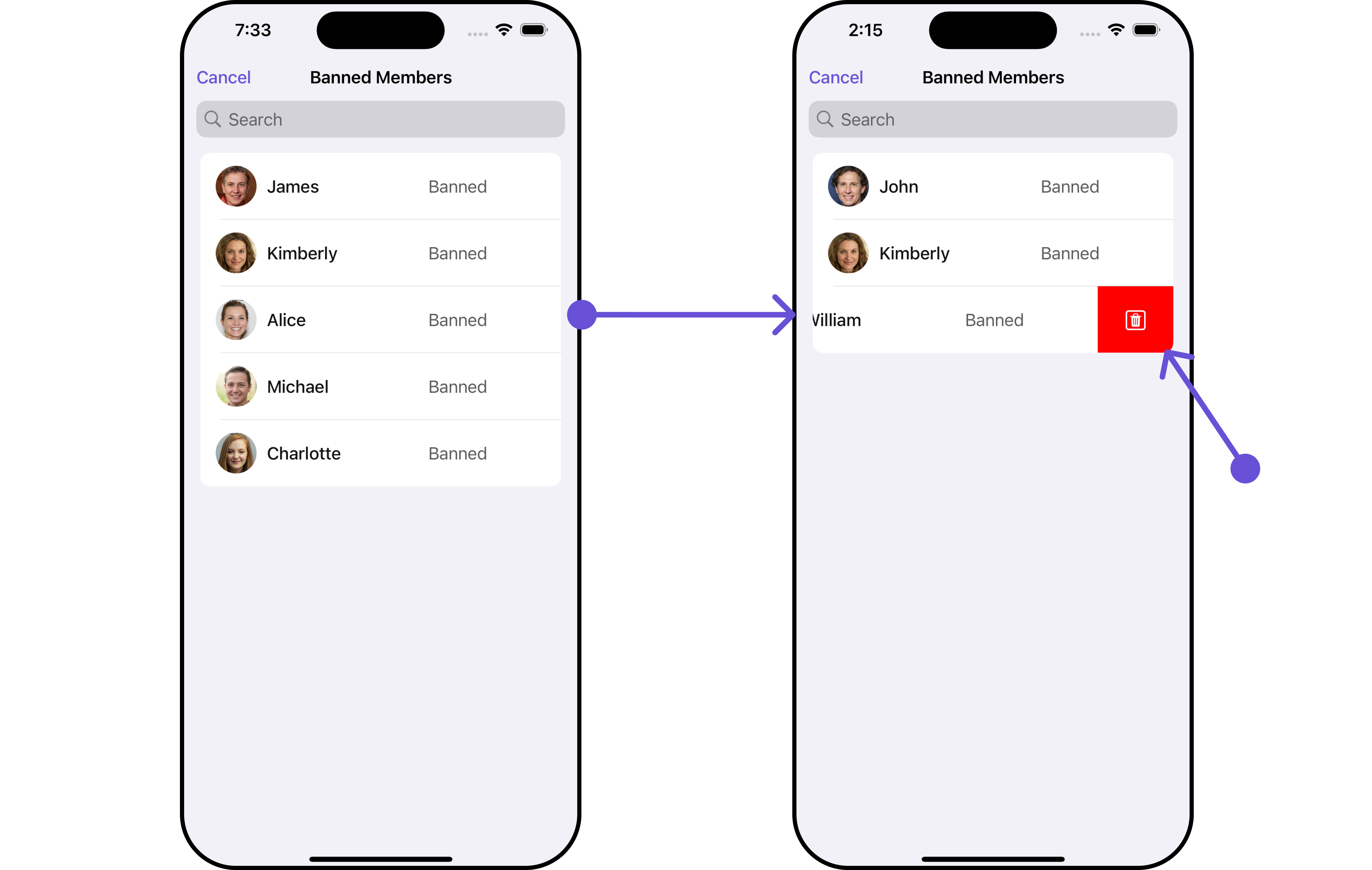 In this example, we've enhanced the interface of `CometChatBannedMembers` by introducing a tailored feature. By adding a custom option, such as "Delete" with a corresponding trash icon, users can now enjoy a more interactive and user-friendly experience.
```swift theme={null}
let customOption = CometChatGroupMemberOption(id: "custom_option_1",
title: "Delete",
icon: UIImage(systemName: "trash.square"),
backgroundColor: .red,
onClick: { groupMember, group, section, option, controller in
print("Custom option clicked!")
})
let cometChatBannedMembers = CometChatBannedMembers(group: group)
.setOptions { group, groupMember in
return [customOption]
}
```
Ensure to pass and present `CometChatBannedMembers`. If a navigation controller is already in use, utilize the pushViewController function instead of directly presenting the view controller.
Ensure to include your GUID and the name of your group when configuring group settings.
***
In this example, we've enhanced the interface of `CometChatBannedMembers` by introducing a tailored feature. By adding a custom option, such as "Delete" with a corresponding trash icon, users can now enjoy a more interactive and user-friendly experience.
```swift theme={null}
let customOption = CometChatGroupMemberOption(id: "custom_option_1",
title: "Delete",
icon: UIImage(systemName: "trash.square"),
backgroundColor: .red,
onClick: { groupMember, group, section, option, controller in
print("Custom option clicked!")
})
let cometChatBannedMembers = CometChatBannedMembers(group: group)
.setOptions { group, groupMember in
return [customOption]
}
```
Ensure to pass and present `CometChatBannedMembers`. If a navigation controller is already in use, utilize the pushViewController function instead of directly presenting the view controller.
Ensure to include your GUID and the name of your group when configuring group settings.
***